


ID Card, Passport, Driver Lice
3.323.00 Reviews
App Specs
- Version
- 1.1
- Updated On
- License
- Free
- Downloads
- 100,000+
- Developer
- FaceOnLive
- Categories
- Libraries & Demo
- Platform
- Android
Screenshots
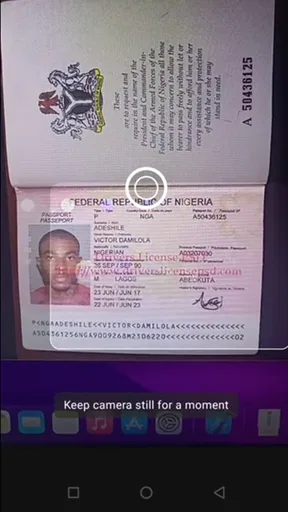
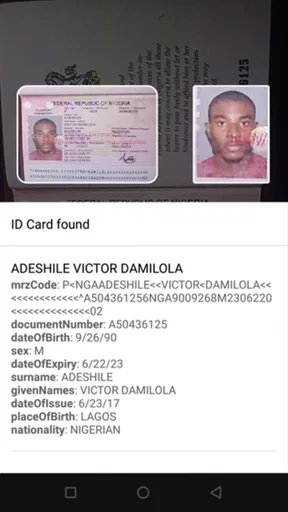
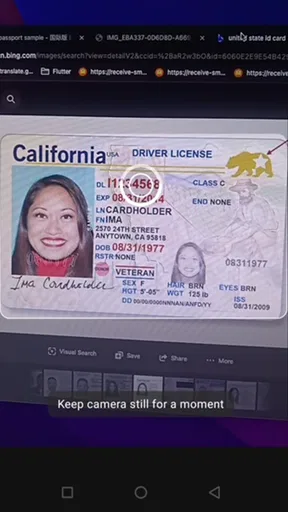
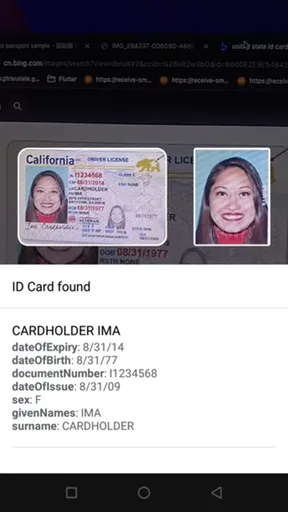
 Analysis by AppCompare
I tested ID Card, Passport, Driver Lice as a practical document-recognition utility rather than as a full document-management suite. It belongs to the Libraries & Demo category, is made by FaceOnLive, and focuses on recognizing identity documents through a phone camera. My first impression was that its value depends less on flashy presentation and more on whether it can fit into a quick, controlled scanning routine.
The app is free, carries an Everyone age rating, and works on Android devices running version 5.0 or later. That broad compatibility makes it approachable for people using older phones, although camera quality, lighting, and device performance will still influence the experience. With a 3.3 average from around 642 ratings and more than 100K installs, it has attracted a meaningful audience, but the rating also suggests that results may feel uneven depending on the document and the conditions.
How connectivity changes the scanning experience
I find connectivity matters most before a scan begins: a weak signal can make an online recognition workflow feel uncertain, while an offline-oriented approach keeps the core task less dependent on the network. I would still rehearse the process in the place and conditions where I plan to use it, then consider what happens when a recognized detail needs to move to another person or tool.
What happens when the connection is unreliable
The most important practical question with any recognition tool is whether it remains useful when the network is poor. ID Card, Passport, Driver Lice is presented around on-device and offline recognition, so its central appeal is that the basic document-reading task is designed to happen on the phone instead of depending on a constant server exchange. That matters when I am travelling, working in a basement office, or using a temporary data connection.
In those situations, the app is more convenient than a web-based scanner that needs a stable upload before it can interpret an image. I can concentrate on positioning the document and improving the lighting rather than waiting for a remote service to respond. This is especially helpful at a reception desk or during travel, where a slow connection can turn a simple check into an awkward pause.
Still, “offline” should not be treated as a guarantee that every surrounding function will behave identically without connectivity. Recognition may be the part intended for local processing, while a user could still encounter normal phone-level issues such as camera access, storage availability, or an unexpected app interruption. I would test the workflow before relying on it for an important trip, rather than discovering its practical limits at an airport or border crossing.
Why local processing can be a real advantage
For identity documents, keeping the recognition step on the device is more than a convenience. A passport, driving licence, or identity card contains information I would rather not send through unnecessary online services. A local workflow can reduce the number of moments in which a document image needs to leave the phone, which is a sensible approach for privacy-conscious users.
Worth Reading Before You Choose

EA SPORTS FC Mobile 26 Is a Bigger Football Game, but It Takes Time

Flipboard Shows What News Apps Must Do Beyond the Feed

Switching to Android Auto Means Rethinking Your Driving Routine

Google Calendar Makes a Crowded Week Easier to Manage

Ludo King Makes the Most of the Minutes Between Plans

Baby Panda World Brings Quick Play to Modern Phones, but Its Game Library Feels Busy
That does not automatically make every use of the app private or risk-free. I would still avoid scanning documents in a crowded place, leave the app when I no longer need it, and check where any resulting information is stored or copied before using the phone for another task. The useful distinction is that local recognition can reduce network exposure; it does not replace careful handling of the document itself.
Comparing it with familiar alternatives
The usual alternatives fall into three groups: a general camera app, a cloud OCR service, or a dedicated identity-verification platform. A camera app is better when I only need a visual record and do not need structured recognition. A cloud OCR tool may handle a wider range of text, but it normally makes connectivity part of the workflow and may be less appealing for sensitive documents.
A professional verification platform can be a better choice for a business that needs identity checks tied to an established compliance process. This app feels more suitable for quick recognition experiments, demonstrations, personal workflows, or a lightweight mobile utility. Its strength is focus and portability, not the broad administrative controls I would expect from an enterprise identity system.
Using it in everyday mobile situations
A realistic example would be preparing for a hotel check-in or a rental-car counter. I could open the app before reaching the desk, place the document on a flat surface, and make a clear capture while I still have time to correct glare or cropping. If the network is weak inside the building, the on-device approach is more comfortable than an online scanner that might stall just when the document is needed.
Another useful situation is a training demonstration. Someone explaining how document recognition works can show the process without arranging a live server connection for every test. That makes the app an appropriate fit for the Libraries & Demo category: it can illustrate a focused recognition workflow without requiring a large software setup.
I would not use it as the only preparation for a journey. Recognition is not the same as official acceptance, and a phone result does not replace the original document. If a border officer, bank, employer, or airline needs a physical identity document, the app cannot change that requirement. Its role is to assist with reading or checking information, not to act as a legal substitute.
Getting a cleaner result on a phone
The best results come from treating the camera like a small scanning station. I place the document on a plain, stable surface, avoid holding it at an angle, and keep the phone parallel to the card or page. Reflections are particularly troublesome on laminated cards, so I move the light source or change the phone angle instead of repeatedly tapping the capture control.
A non-obvious tip is to prepare the scene before opening the recognition step. Wiping the camera lens, turning off a harsh overhead reflection, and making sure the document edges are visible can save more time than trying several rushed captures. For passports, I would keep the page flat without forcing the binding and make sure the machine-readable area is not hidden by a finger or shadow.
For a driving licence or identity card, I would capture one side at a time if the layout requires it, then compare the result with the printed document rather than assuming a successful-looking scan is automatically accurate. Small errors in names, dates, or document numbers can be hard to notice when I am only looking at a quick preview.
Handling failed recognition without wasting time
Recognition failures are not always caused by the app. A glossy surface, low contrast, a partly covered corner, motion blur, or a document outside the app’s expected format can all produce a poor result. When the first attempt fails, I change one condition at a time: improve the light, flatten the document, move the phone slightly farther away, and then try again.
This step-by-step approach is better than rapidly repeating the same capture. It tells me whether the problem is positioning or recognition itself. If a passport page works but a particular card does not, I would not conclude immediately that the phone is broken; the card’s design, reflection, or layout may simply be harder for the recognizer to interpret.
Recovery is also easier if I keep the original document beside the phone. After a scan, I check names, numbers, and dates character by character. Characters such as zero and the letter O, or one and the letter I, can be visually similar. The app may save time by extracting information, but I remain responsible for confirming anything I plan to reuse.
Where another tool is the safer choice
If my goal is to archive a readable copy, a dedicated document scanner may be more appropriate because its main job is image quality and page preservation. If I need broad text extraction from receipts, letters, or forms, a general OCR application may offer a wider target range. If I need identity verification for customers, I would choose a service built around that business process rather than a compact recognition app.
I would also skip this app when I need a guaranteed result in a high-stakes setting and have no time for a second check. A free mobile recognizer is useful as an aid, but it should not become the sole authority for a legal, financial, medical, or travel decision. The right expectation is assisted reading, not official validation.
Using it with sensitive information
My data-conscious routine would be simple: scan only when necessary, keep the document out of view of other people, verify the extracted text immediately, and close the session when finished. I would avoid making extra screenshots or copying sensitive numbers into unrelated notes unless there is a clear reason. Local processing can make the workflow more comfortable, but good privacy habits still matter on the device itself.
I would also be selective about testing. It is tempting to scan every available card just to see what the app recognizes, but identity documents are not ideal test material. For demonstrations, use a document that you are authorized to handle and avoid sharing the captured screen. This is one of the practical trade-offs: the app is easy to experiment with, yet the material being recognized deserves more care than an ordinary barcode or product label.
What the current package tells me
The current version is 1.1, and the app was released on November 2, 2021. Those details place it in a relatively established but compact form rather than suggesting a constantly changing platform. I would appreciate that simplicity if I wanted a focused utility, but I would also keep expectations realistic about how much refinement or expansion a small version number may represent.
FaceOnLive has kept the basic proposition easy to understand: use a phone to recognize an ID card, passport, or driving licence. The free price removes the need to make a financial commitment before testing it. That is useful for occasional users, students, developers demonstrating recognition concepts, or travellers who want a backup aid rather than a major document system.
The trade-off is that free and focused does not mean universal. I would test my own document types, lighting conditions, and phone before building a routine around it. The average rating of 3.3 is a useful reminder to judge it by a short personal trial instead of assuming that the store summary will predict every result.
My connectivity verdict
After using it as a mobile recognition tool, I see ID Card, Passport, Driver Lice as most valuable when connectivity is inconvenient and the task is narrow. Its on-device, offline-oriented approach makes sense for travel, demonstrations, and quick document checks where I want less dependence on a remote service. The free entry point and older Android compatibility make it easy to try.
Its limitations are equally important. A difficult document may need several attempts, glare can undermine recognition, and extracted details still require human verification. It is not a replacement for an original identity document, a professional verification service, or a high-quality archival scanner. Users who need broad OCR or formal compliance tools should choose something designed for that purpose.
My recommendation is to treat it as a convenient assistant, not an authority. Try it at home with the documents you are actually likely to handle, test the workflow with connectivity disabled if offline use matters to you, and build in time for checking every important field. If that limited, privacy-aware workflow matches your needs, this app can be a handy addition to an Android phone. If you need guaranteed verification, extensive document management, or polished business controls, a more specialized alternative will be the better choice.
A practical routine for an occasional scan
For an everyday handoff, I would prepare the document before the other person is waiting: choose a quiet spot, open the recognition tool, and keep the original in my hand or within reach. Once the result appears, I would read it against the source and only then pass along the specific details needed. That small pause is useful because it separates capture from sharing; it reduces the chance of sending an unverified character simply because the scan looked successful.
This routine suits someone who checks a document now and then, or who wants to demonstrate recognition without turning the phone into a permanent filing cabinet. I would skip it if my real need is to store a searchable archive of many pages, manage identity records for a team, or process documents in a regulated workflow. In those cases, an archival scanner or a purpose-built verification system is a better match than a narrowly focused phone utility.
Deciding whether it fits your phone and task
Before relying on it away from home, I would do a short rehearsal with the actual document type and the same phone I plan to use. I would check whether the camera can focus cleanly, whether the screen is readable in the intended lighting, and whether the recognition step still works with the network unavailable. If any of those conditions are awkward, I would treat the app as a backup rather than the main route.
That quick trial also answers a practical question: does the app save enough effort compared with simply looking at the document? For a clear card and a one-off check, manual reading may be faster and less fiddly. Recognition becomes more useful when I need to transfer fields carefully or show a repeatable demonstration. The best fit is therefore not every document holder, but someone whose specific task benefits from structured reading and who can spare a moment to verify the output.
Who will get the most from it
I can recommend trying it to students, developers, travellers, and people handling occasional document checks who want a compact, offline-oriented recognition option. Its focused purpose is easier to understand than a general OCR suite, and the local-processing approach is appealing when I do not want a scan to depend on a network connection. The free app also makes a low-commitment test reasonable, provided I use non-sensitive or authorized material and check the result carefully.
For anyone who needs a polished archive, broad document coverage, guaranteed identity validation, or shared workplace controls, I would look elsewhere. A standard camera is often enough for a simple visual record; a general OCR app is better for mixed paperwork; and a formal verification product is more suitable when an organization has to make consequential decisions. ID Card, Passport, Driver Lice makes the most sense in the narrower space between those options: a handy recognition aid for a quick, controlled task, with the original document and my own judgment still in charge.
Pros
- Keeps key identity details accessible in one convenient place.
- Simple interface makes information easy to find quickly.
- Useful for organizing multiple document types together.
- Can reduce the need to carry physical document copies.
- May help users review document details before appointments or travel.
Cons
- Does not replace legally valid physical identification documents.
- Entering sensitive personal data may raise privacy concerns.
- Incorrect details could cause problems if not checked carefully.
- Features may vary depending on the device or operating system.
- Lost or unsecured phone access could expose stored document information.
FAQs for ID Card, Passport, Driver Lice
What is ID Card, Passport, Driver Lice, and what can I use it for?
ID Card, Passport, Driver Lice is designed as a convenient reference and document-management tool for keeping essential identification details organized in one place. Depending on the version and region, it may help users store or review information related to an ID card, passport, or driving licence. It should be treated as a personal utility, not as an official government document or a replacement for carrying valid identification.
Does ID Card, Passport, Driver Lice create official digital versions of my documents?
No, the app should not be assumed to create legally valid digital copies of an identity card, passport, or driving licence. Any information entered or displayed in the app is generally intended for personal reference, organization, or convenience. Official acceptance depends on the laws and institutions in your country, so you should always carry the original document or use an officially supported government digital-ID service when required.
Is my personal information safe when using the app?
Because this type of app may involve highly sensitive information, including document numbers, names, dates of birth, and identification details, privacy should be considered before entering anything. Review the app’s privacy policy, permissions, storage method, and developer information carefully. Avoid adding complete document data unless you understand how it is protected, and never share screenshots or access codes publicly.
Can I use the app without an internet connection?
Some features may work offline if information has already been saved on the device, but this can vary according to the app version, operating system, and the feature being used. Online functions such as synchronization, backups, updates, advertisements, or external verification may require internet access. Test the features you need before traveling, and do not rely on the app as your only source of identification.
Is ID Card, Passport, Driver Lice free to download, and are there any requirements?
The application may be available as a free download, although certain versions can include advertisements, optional purchases, or limitations on specific tools. Before installing it, check the current store listing for supported Android or iOS versions, developer details, ratings, and requested permissions. Make sure your device has enough storage and use only the official Google Play Store or Apple App Store.


